Anatomy of signed adware: an EV certificate, 103 native actions, and an update channel that checks nothing
A static teardown of PC App Store, a commercial Windows storefront signed with a valid DigiCert Extended Validation certificate: how its string layer works and how to break it, why its updater is a remote-code-execution channel by construction, what 103 bridge actions hand to a remotely-served web page, and what the operator sells that makes all of it worth building.
TL;DR
- Four x64 PE binaries, build
fa.2047, all signed by FAST CORPORATION LTD (Ra'anana, IL) with a valid DigiCert EV code-signing certificate. Not packed, no anti-debugging, no VM detection, no process injection, no credential theft. This is grayware. - What makes it dangerous is architecture. No signature-verification capability exists in any of the four binaries (provable by import absence), yet the updater fetches a manifest and executes what it names. I retrieved that manifest live: 68 bytes of unsigned plaintext, a version string and a URL.
- The WebView2 control plane exposes 103 native actions to pages served
from the vendor's CDN, including
exec_program,download_file,dm_executeandremove_file. The live bridge client contains zero client-side origin checks. - Strings are obfuscated with base64 plus a keyed XOR carrying a 5-byte prefix key and a skipped filler byte. I recovered the algorithm from disassembly and 536 strings from the four binaries. Everything else in this post rests on that.
- Three of the four binaries carry 512 bytes smuggled inside their own Authenticode certificate table, a region Windows excludes from the signature hash. The blob is written per download: its trailer embeds this copy's install timestamp.
- A shipped config enumerates five security vendors (ESET, Kaspersky,
Panda, Sophos, Malwarebytes) by download URL, filename and Authenticode subject
string, under the internal key
badApps. The software also contains a recursive Downloads-folder watcher. - It enumerates the host's installed antivirus through WMI
SecurityCenter2, and beacons the in-app search box keystroke by keystroke: I recovered{"q":"force qui"}from a real victim's cache. - The why is not mysterious. The operator sells partner placement against a
claimed 10M+ active users and requires a linked payment card. The
install base is the product, and the
badAppslist is exactly what would remove it.
If you take one thing from this: a valid EV signature certifies who compiled the binary, not what the binary is allowed to run.
Background: where this sits
PC App Store presents as a third-party software storefront for Windows 10/11. It is published by Fast Corporation LTD, an Israeli company (registration 515636181), and it is properly signed, with an Extended Validation certificate that chains cleanly to DigiCert and carries an RFC-3161 countersignature. SmartScreen has nothing to complain about.
The vendor's own FAQ answers the question "I don't remember installing PC APP STORE on my PC, how did I get it?". A vendor that needs that FAQ entry is describing bundled distribution, and that is the honest framing for this whole family: it is not delivered by an exploit, it is delivered by an installer the user ran for some other reason.
Everything below is static analysis of the shipped tree plus passive OSINT and read-only HTTP against the live infrastructure. Nothing was detonated; the binaries are Windows PEs and the analysis host is Linux. Where a claim rests on capability rather than observed behaviour, I say so, because on this sample the distinction is load-bearing.
The sample
The tree is 603 files, 105,005,405 bytes, and includes a real WebView2 browser profile from an infected host, which turned out to be a richer source than the binaries.
| File | Size | SHA-256 | Signature |
|---|---|---|---|
PCAppStore.exe |
5,994,384 | 85f8913f2435128fb4389a2fc61946d1cb7a773db84df61fafa823c70b496fa0 |
EV + 512 B stuffed |
AutoUpdater.exe |
1,308,048 | 3eba16ba567ac218b47d04bca20507c345d572d481271798382a4e9132f6dbee |
EV + 512 B stuffed |
Watchdog.exe |
877,456 | e041bd6d0c4a701ecf0b99d15263f36ed3311fb4f685df7cffe2d9f4e20c536e |
EV + 512 B stuffed |
Uninstaller.exe |
411,536 | 3fd0be01793c19bfe0782d6d95b0997eca350c1735c9ebf1caf8bf289993eaca |
EV, clean |
All four share a build path: C:\Build\Build_2047_D20260612T115830\fa_rss\Release\,
compiled 2026-06-12. The main binary's internal name is fa_rss.exe. A
fifth component, the service PcAppStoreSRV.exe, is referenced
by the Watchdog and deleted by the Uninstaller but is not present in the tree. No binary here imports CreateServiceW
either, so a
separate Setup.exe installs it. The shipped sample is incomplete relative to a
real infection, which is worth knowing before you diff it against anything.
PCAppStore.exe also embeds a genuine Microsoft binary as a resource:
Microsoft.Management.Deployment.OutOfProc.dll v1.26.230.0, the winget
out-of-proc COM server, 237,096 bytes. It is not trojanised. It is there because the
storefront drives Microsoft Store installs. Do not block it.
Layer one: the string obfuscation
The first thing you notice is an absence. This is an entirely network-driven application,
and strings across all four binaries yields essentially no URLs. Two domains
appear in plaintext across six megabytes of code. That is not an accident of compilation.
String literals live in .rdata as base64 text with no NUL
terminator, referenced as {pointer, length} pairs. After base64-decoding, the
first five bytes are the XOR key, and from then on every fifth byte is a filler that gets
skipped. In Watchdog.exe the base64 stage sits at 0x140008cc0
with its reverse-alphabet table at 0x1400b0ab0, and the XOR stage runs
0x1400126f0-0x1400127ab, inlined at hundreds of call sites.
# after base64-decoding the .rdata literal:
key = dec[0:5]
out, j = bytearray(), 0
for i in range(5, len(dec)):
    if (i - 5) % 5 == 4:        # filler byte, skipped
        continue
    out.append(dec[i] ^ key[j % 5])
    j += 1
The five-byte prefix is both key and per-string salt, so two identical plaintexts encode
differently. The skipped filler is normally a constant, which makes a useful structural
check when you are sweeping .rdata for candidates: decode, verify the filler
invariant, keep the hit. Running that over the four binaries recovered 536
strings, and it is the pivot for the entire rest of this analysis. Every address
cited below came out of it.
Worth being clear about what this is and is not. It is not encryption; the key ships with
every string. It defeats strings, casual triage, and naive YARA, which is
the threat model a commercial vendor cares about, because the adversary here is
an antivirus signature, not a reverse engineer.
Layer two: 512 bytes inside the signature
Three of the four binaries produce an odd complaint from osslsigncode:
"Corrupted attribute certificate table." The Uninstaller does not, and verifies
cleanly. The cause is arithmetic.
| Field | Value |
|---|---|
| Security directory size | 11,152 bytes |
First WIN_CERTIFICATE.dwLength |
10,640 bytes |
| Difference | 512 bytes of undeclared data |
Windows excludes the attribute certificate table from the Authenticode hash. It has to: that is where the signature itself lives. Anything appended past the end of the PKCS#7 blob therefore rides along on a validly signed binary without invalidating it. The table becomes malformed, which is why a strict parser objects, but the signature still verifies.
Each blob is 480 bytes of high-entropy data (7.50-7.54) followed by a 32-byte trailer that is byte-identical across all three binaries:
hex | the shared trailer12 44 5F 55 2D 45 5E 1E 76 61 49 2D "0101788861884132659" 00
└─ 010 | 1788861884 | 132659
1788861884 = 2026-09-08 10:04:44 UTCThat timestamp is this copy's install time. The WebView2 history shows the
first session 29 seconds later, at sessId=1788861913. So the blob is written
per download, not at build time: one signed build, individually tagged
for each affiliate and each fetch, without ever touching the signing key.
I did not recover the plaintext. A keystream-reuse test (XOR the three blobs pairwise, which surfaces plaintext⊕plaintext if a stream keystream were reused) produced no structure, and an exhaustive single-byte XOR sweep produced no printable candidate. What the blob carries, however, is strongly indicated by three independent decoded strings:
decoded strings | the tell// AutoUpdater.exe @ 0x1400e18a0
guid: {}\nversion: {}\ndomain: {}\ncorrectEnc: {}
// Watchdog.exe @ 0x140085f30
guid: {}\nversion: {}\nisAdmin: {}\ncorrectEnc: {}
// URL templates stored with the host MISSING
{}/fa_version.php?guid={}&end_v={}&nocache={:d} // @ 0x1400df0f0
{}pixel.gif?guid={}&version={}&evt_src={}&... // @ 0x14049c860The binaries hold URL paths but not the host. They log a domain and a
boolean correctEnc at startup. And telemetry carries an fcid
parameter that appears nowhere as a literal. The obvious reading is that the smuggled blob
supplies the per-affiliate C2 domain and campaign ID, and correctEnc reports
whether it decrypted. Confidence: medium. I proved the blob exists, proved
the placeholders exist, and did not locate the reader routine or decrypt the payload. State
it as a hypothesis, because that is what it is.
The update channel
This is the finding that matters most, and it is provable twice over: once from the binaries, once from the live service.
AutoUpdater.exe fetches a manifest from an S3 bucket
(0x1400df250) or from the affiliate domain, parses fields named
link, dlLink, decryptKey, xorKey,
payload, update_type, runParams and
installerPath, XOR-decrypts the download with the key the server just
supplied, backs up the existing install, and executes:
starting installer: {}          // @ 0x1400dfb40
"{}" /i /step=setup             // @ 0x1400dea30
"{}" /i /step=clean             // @ 0x1400dfda0
installer exit code: {}
Nothing in that path authenticates anything. This is verifiable by absence across all four binaries, and import absence is provable in a way that import presence never is:
- No
wintrust.dll, noWinVerifyTrust: not as an import, not as a string, not as a dynamically resolved name. - No
BCryptVerifySignature, noBCryptImportKeyPair, noBCryptImportKey. - No
CryptVerify*, noCertVerify*, noCryptMsgControl. - The entire bcrypt surface is
BCryptOpenAlgorithmProvider,CreateHash,HashData,FinishHash,DestroyHash,CloseAlgorithmProvider,GenRandom. Hashing and randomness. No asymmetric cryptography of any kind.
A server-supplied XOR key is obfuscation, not integrity. So I fetched the manifest, read only, with an all-zero synthetic GUID so nothing plausible entered their analytics:
http | the live update manifestHTTP/1.1 200 OK
Content-Type: binary/octet-stream
Content-Length: 68
Last-Modified: Thu, 06 Oct 2022 08:47:50 GMT
x-amz-version-id: vVe6i.68nW2dRSQe8irXeeT1H8QOvgS1
fa.1051t
https://repcdn.pcapp.store/download/fa/fa.1051t/Setup.exeSixty-eight bytes. A version string and a URL. No signature, no hash, no key material. That object is the entire trust anchor for what every installed client downloads and runs. Whoever can write it, or sit on the path to it, executes code on the install base. The bucket is not publicly listable and has object versioning enabled, so the exposure is write-access or interception rather than an open bucket. The trust model is the finding, and it is unambiguous.
The WebView2 bridge: 103 actions
The application's UI is a WebView2 window rendering pages fetched at runtime from
repcdn.pcapp.store. That makes remote HTML the control plane, and the question
is what the native side will do when the page asks.
The answer came from the operator's own JavaScript, first out of the victim's WebView2
cache and then re-fetched live from
repository.pcapp.store/pcapp/src/app/appWindow.js, 225,104 bytes, the same
size in both places. The transport is a thin wrapper over a single primitive:
window.chrome.webview.postMessage({ action: action, data: payload });
window.chrome.webview.addEventListener("message", handler);
Enumerating the literal action names in that file yields 103. Most are
window chrome: minimize_window, set_theme,
start_drag_window. These are not:
| Action | What the page gets to do |
|---|---|
exec_program | execute an arbitrary program |
download_file, dm_download, dl_app | download an arbitrary file |
dm_execute, dm_run, dm_install_app | execute or install a downloaded file |
dm_ms_install, msstore_download_app | drive Microsoft Store / winget installs |
remove_file | delete a file from disk |
create_shortcut, pin_to_taskbar | create shortcuts (persistence-capable) |
launch_app | launch installed applications |
clipboard_write_text | write the system clipboard |
navigate_to, open_link, open_offer | navigate the WebView, open URLs |
check_app_status | query installed-software state |
Then the obvious question: is the bridge gated to the vendor's own origins? On the client
side, no. Occurrence counts in the live 225 KB file: origin 0,
location.host 0, referrer 0, allowedOrigins 0. The
JavaScript does nothing whatsoever to constrain who may use it.
That is not the same as saying there is no gate. Enforcement could live in the native
dispatcher, which I did not locate: the strings that would anchor it are obfuscated and
the dispatcher is a long comparison chain in a 4 MB .text. So: the
exposure is real and the gate is unverified. What is certain is that a compromise
of repcdn.pcapp.store, or a TLS-intercepting position in front of it, is worth
exec_program on every installed host, with no exploitation required. That is
the product working as designed with a hostile origin.
The Downloads watcher and the badApps list
Shipped alongside the binaries is cache/dlapps_setup.json, base64-encoded and so trivially
readable. It decodes to 33 rules in two classes. Each rule carries a
filename regex, a download-URL regex, and an Authenticode signature-subject
string.
| Class | Key | Members |
|---|---|---|
type: 1 |
badApps0-badApps6 |
ESET ("ESET, spol. s r.o."), Kaspersky, Panda
("Panda Security S.L."), Sophos ("Sophos Ltd"),
Malwarebytes, AutoHotkey, Total Commander
("Ghisler Software GmbH") |
type: 0 |
numeric productId |
26 mainstream apps: Netflix, Zoom, Chrome, Steam, Telegram, TikTok, WhatsApp, Teams, 7-Zip, WinRAR, TeamViewer, CCleaner... |
Five antivirus products and the two tools most useful for inspecting or scripting a
machine, filed under badApps. The matching is genuinely implemented:
PCAppStore.exe imports exactly the chain needed to read a file's
claimed Authenticode signer -
CryptQueryObject  →  CryptMsgOpenToDecode  →  CryptMsgUpdate
                  →  CryptMsgGetParam  →  CertFindCertificateInStore
                  →  CertGetNameStringW

// CryptMsgControl is ABSENT - so the signature is never verified.
That set reads the name off a PKCS#7 without ever checking that the signature is valid. It is identification, not a security check, which is what you need to recognise "this downloaded file claims to be from Sophos."
Scope: what can it actually see?
The consequential question is whether this reaches downloads made in Chrome and Firefox, or only inside the app's own window. Two facts settle the capability half.
First, PCAppStore.exe imports ReadDirectoryChangesW and calls it
exactly once, at 0x14012bd04. I located it by scanning .text for
FF 15 disp32 (call qword [rip+disp32]) resolving to the IAT
entry at 0x140408360. The arguments are unambiguous:
mov  dword [rsp+0x20], 0x5F   ; dwNotifyFilter
mov  r9d, 1                   ; bWatchSubtree = TRUE      <-- RECURSIVE
mov  r8d, [rsp+0x44]          ; nBufferLength
mov  rdx, [rsp+0x70]          ; lpBuffer
mov  rcx, [rsp+0x78]          ; hDirectory
mov  [rsp+0x30], rax          ; lpOverlapped != NULL      <-- ASYNCHRONOUS
call qword [ReadDirectoryChangesW]
Filter 0x5F is FILE_NAME | DIR_NAME | ATTRIBUTES | SIZE | LAST_WRITE |
CREATION. That is a general-purpose recursive directory monitor, not a WebView2
download callback.
Second, FOLDERID_Downloads sits at 0x14046e020 inside a
known-folder GUID table, and is referenced exactly once, by a lea at
0x1400befb9 feeding SHGetKnownFolderPath. (Check it:
0x1400befb9 + 7 + 0x3af060 = 0x14046e020.) The same helper module resolves
FOLDERID_Startup and FOLDERID_CommonStartup.
What is absent is equally informative: no WSAIoctl, no LSP, no
SetWindowsHookEx, no hooking library anywhere in the suite. Observation is of
files on disk after they land, which is why the rules match on
filename and on a downloaded file's Authenticode subject, and why they also need a URL
regex supplied from elsewhere.
So the software holds the complete technical means to observe downloads made by
any browser. That materially raises what the badApps list means.
What I did not establish: that the handle passed to the watcher
is specifically the Downloads folder (it arrives via a struct at [rsp+0x90]
and I did not trace that dataflow), nor the enforcement action itself: block, cancel,
delete, substitute, or merely report. The config proves targeting and the code proves the
watching capability. Neither proves the action. Do not report system-wide
antivirus-download interference as demonstrated.
That restraint matters. The difference between "curates its own storefront" and "sabotages your antivirus install" is one function call I have not read, and writing the stronger claim without it would be exactly the kind of confident, well-formatted, wrong verdict worth avoiding.
Reconnaissance, and the search box
The decoded strings expose a WMI collector that builds WQL against CIMV2 and,
notably, SecurityCenter2:
ROOT\  |  WQL  |  "SELECT "  |  " FROM "

SecurityCenter2 → AntiVirusProduct   → field sec_av
                → AntiSpywareProduct → field sec_as
                → FirewallProduct    → field sec_fw

CIMV2 → Win32_OperatingSystem, Win32_Processor, Win32_VideoController,
        Win32_ComputerSystem, Win32_ComputerSystemProduct,
        Win32_DiskDrive, Win32_BIOS
Field names recovered alongside include macs, ipv6,
processes, parent_proc, parent_proc_path,
disk_name, bios_releasedate and sys_lang, plus an
installed-software inventory read from the Uninstall registry key. The
vendor's FAQ describes this as "a system scan to gather software-related information." That
is true as far as it goes; it omits that the scan specifically enumerates which antivirus
you are running.
The telemetry is where capability becomes observed behaviour. The victim's WebView2 cache
held 253 beacons to ev.pcapp.store/p.gif:
| Count | evt_action |
data= payload |
|---|---|---|
| 171 | viewed_products | {"location":"search","products":[...ids...]} |
| 81 | search_field_type | {"q":"..."} |
| 1 | search_field_click | {"q":""} |
Recovered q values include {"q":"9"} and
{"q":"force qui"}, a query captured mid-word, on its way to becoming
something like "force quit". The in-app search box is transmitted as the user
types, not on submit. That is not inferred from code; it is read out of a real
host's cache.
Persistence, and a watchdog that keeps a checklist
Registry paths recovered verbatim from the decoded strings:
| Key | Purpose |
|---|---|
...\CurrentVersion\Run | autostart |
...\Explorer\StartupApproved\Run | the key that records a user disabling a startup entry in Task Manager. Writing it re-enables the app against an explicit choice |
SOFTWARE\PCAppStore | own config, InstallPath |
...\Uninstall\PCAppStore | Add/Remove Programs entry |
Software\Classes\... | URL protocol handler: any page in any browser can launch the app |
...\Windows Error Reporting\LocalDumps\ | configures crash-dump capture |
The StartupApproved\Run entry deserves the callout. That key is where Windows
records that the user switched a startup item off. Writing it is how you switch it
back on.
Watchdog.exe logs its supervision checklist every cycle, and the format string
(0x140085350) is a complete statement of what the software considers worth
defending:
ping #{}
  isPCAppRunning: {}   isAdmin: {}   autoStart: {}   autoUpdate: {}
  AutoUpdater: {}      PcAppStore: {}      PcAppStoreSRV: {}
  Uninstaller: {}      StartupLnk: {}
Not just the process: the autostart setting, the startup shortcut, the service, and each sibling binary. Precisely the artifacts a user or an AV product would remove. Monitoring is proven from the format string. Active repair is not. I did not locate the false-branch handlers, and the honest reading is that the checklist tells you what it watches, not what it does about it.
The Uninstaller, for its part, elevates via runas, deletes the
PcAppStoreSRV service, and then removes itself through a generated
uninstaller00_temp.bat containing the usual :loop /
del "%~f0" self-delete dance. It also beacons out during uninstall and renders
a remotely-supplied page while doing it, which is the natural place for a retention offer.
For incident response, prefer manual removal.
Why any of this exists
The technical findings only cohere once you read the operator's marketing, which is not subtle:
"Scale Smarter, Monetize Faster - Grow Your Revenue & Reach Ideal Users via the PC App Store Platform. Become a Partner."
"Massive Exposure - Put your apps in front of a global 10M+ active users."
"We handle the safety checks and setup behind the scenes, so you can enjoy your favourite apps safely."
The product being sold is access to the installed base. That is exactly
what the beacon parameters encode: partner_id, ad_id,
ad_group_id, campaign_id, strategy_id,
place, product_id, and product_type=resell. Every
impression and every keystroke feeds the targeting that makes placement sellable.
The onboarding flow closes the loop. Its credit-card screen ships with a poster frame, served from the operator's own CDN:
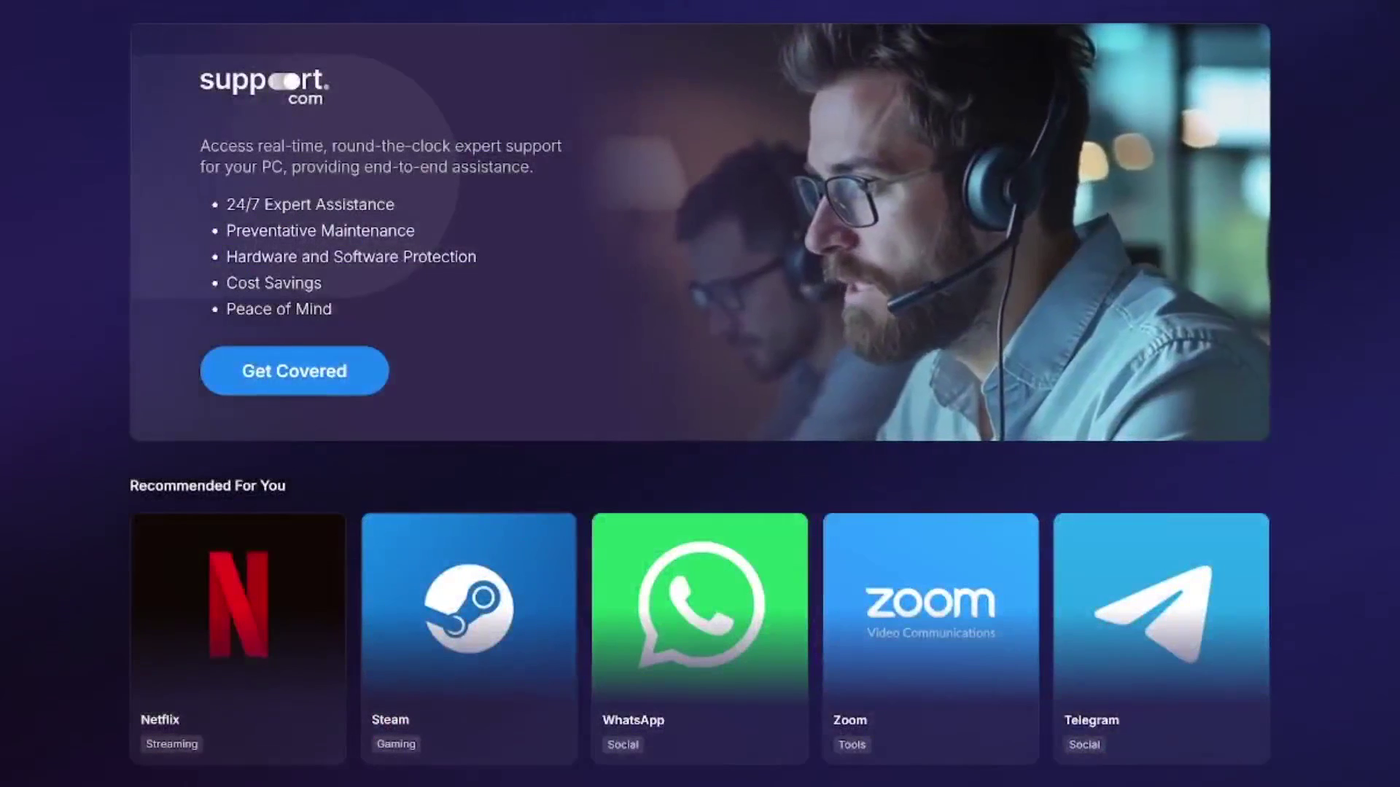
type:0 rules in dlapps_setup.jsonThe vendor's FAQ confirms the mechanics without prompting: "PC APP STORE is a store and to enjoy the offers you need a valid payment method linked with your account." The inventory it lists is prepaid digital credit (PS5, Steam, Battle.net, Google Play), a high-chargeback category. The recurring subscription is the conversion that pays; the app tiles are the traffic that gets you there.
Which explains the badApps list better than any technical reading does. The
install base is the asset. resell revenue depends on it persisting. The listed
products are the ones that would remove it.
(On the support.com branding: the artwork is served from the operator's CDN and proves what the flow markets. It does not by itself establish a contractual reseller relationship with Support.com Inc.)
Infrastructure
This is not a throwaway campaign. pcappstore.com was registered
2008-11-13 (a seventeen-year-old operation) and both product domains were
renewed out to 2031 in August 2026.
| Domain | Created | Registrar | Privacy |
|---|---|---|---|
pcappstore.com | 2008-11-13 | CommuniGal / GalComm (HK/IL), IANA 418 | no |
pcapp.store | 2020-10-10 | Communigal (GalComm) | no |
fcrp.io | 2023-03-10 | GoDaddy | Domains By Proxy |
All three share ns10-15.dnsmadeeasy.com. Hosting is deliberately multi-cloud:
pcapp.store round-robins across ten-plus A records split between
DigitalOcean and Vultr; repcdn and
repository are CDN77; ev.pcapp.store gets its own
DigitalOcean droplet; updates live on S3; a second telemetry path runs through CloudFront.
Mail goes through AWS SES, and the SPF record authorises ActiveTrail, an
Israeli email-marketing platform. They run outbound campaigns.
fcrp.io ("Fast Corporation") surfaced from a misconfiguration: the domain's
/.well-known/security.txt serves the Terms & Conditions instead of a
security contact, and that document names the corporate site and the company registration
number, matching the code-signing certificate exactly. The corporate domain hides its
registrant behind privacy protection; the product domains do not.
One note on the registrar, because it is the kind of detail that invites a bad inference. GalComm was the registrar named in Awake Security's 2020 research into a large malicious Chrome-extension campaign, a characterisation GalComm publicly disputed. That is registrar-level context only. It is not evidence connecting this operator to that campaign, and should not be reported as such. Registrar geography tells you where it was convenient to buy a domain.
What could not be determined
Static analysis has edges, and on this sample they are worth naming precisely:
- The
badAppsenforcement action. The largest remaining gap. Needs the native matcher routine or a Windows VM. - Native-side origin gating on the bridge. Ruled out on the client; unverified in the binary.
- The 480-byte certificate-table payload. Not decrypted; the reader routine not located.
- Whether the Watchdog repairs removed persistence or only reports it.
PcAppStoreSRV.exe: absent from the tree, privileges unknown. If it runs as SYSTEM the update channel is considerably worse; that is unverified.- The machine GUID's origin.
84C7754C-2FBE-11B2-A85C-8CB3CF04B59Eis v1-shaped with node8C:B3:CF:04:B5:9E, multicast and locally-administered bits both clear, i.e. formatted as a real assigned NIC address. But the binaries importUuidCreate(v4 random on modern Windows), neverUuidCreateSequential, and the embedded timestamp decodes to an implausible 1970 date. So it is not produced by the imported API. If that node is the host MAC, the identifier survives an OS reinstall. Probable, not proven.
Negative results worth recording
These matter because they are routinely assumed of adware and are simply not here:
- No anti-analysis. No debugger checks, no hypervisor or CPUID probing,
no analysis-tool process lists, no timing checks. The
dbghelpusage is a genuine crash reporter. - No credential theft. No browser-profile paths (no
Login
          Data
, no Chrome or Firefox profile directories) anywhere in the binaries or the decoded strings. - Not packed. Section entropy 5.1-6.5. Only the string layer is obfuscated.
- No injection, hooking, rootkit or driver, and no LOLBin abuse:
powershell,wmic,schtasks,rundll32,vssadminare absent throughout. - No direct Defender tampering was found.
Detection engineering
File hashes churn every build. Two anchors are durable, and one technique is worth hunting generically.
Detect on the signer, not the hash. A single EDR query for anything signed
FAST CORPORATION LTD catches every build, past and future, until the
certificate rotates. It is the highest-yield query available and it is one line.
Hunt StartupApproved\Run writers. Very few legitimate products
write the key that records a user's decision to disable a startup item. Hunting it broadly
finds this family and a good deal of other user-hostile software.
Certificate-table stuffing is a generic technique, and you can detect it
structurally rather than by content: a signed PE where the security directory size exceeds
the first WIN_CERTIFICATE.dwLength, rounded up to an 8-byte boundary. Expect
some benign hits (a few installers legitimately append data), but combined with an
unfamiliar signer it is a strong signal. In YARA:
import "pe"

rule SUSP_Win_Authenticode_CertTable_Stuffing_Generic
{
    meta:
        description = "Extra data appended inside the PE attribute certificate table"
        note        = "hunting - the technique is not inherently malicious"
    condition:
        uint16(0) == 0x5A4D and pe.is_pe and
        pe.number_of_signatures > 0 and
        pe.data_directories[4].size > 0 and
        pe.data_directories[4].virtual_address > 0 and
        pe.data_directories[4].size >
            ((uint32(pe.data_directories[4].virtual_address) + 7) & ~7)
}
Validated against this sample: it matches the three stuffed binaries and correctly does not
match the clean Uninstaller.exe. That discriminating result is what makes it
trustworthy. A rule that matched all four would be matching "is signed."
For host detection, the named kernel objects are stable and cheap: mutex
PCAppStoreMutex, mutex Local\PCAppStoreUpdater, event
PCAWatchdogClosingEvent.
Indicators
Block the domains. The CDN hosts at the bottom are context only: blocking them breaks unrelated traffic.
| Type | Value | Note |
|---|---|---|
| Domain | pcapp.store | Primary app/API host. Root returns 404; only application paths serve. |
| Domain | ev.pcapp.store | Telemetry sink, /p.gif. Dedicated DigitalOcean host. |
| Domain | repcdn.pcapp.store | Front-end JS: the code that drives the native bridge. |
| Domain | repository.pcapp.store | Media and payment-form assets; serves appWindow.js. |
| Domain | aprs.pcapp.store | /i.php, from decoded string 0x1404500b0. |
| Domain | pcappstore.com, fcrp.io | Distribution site and corporate site. |
| Host | pcappstore.s3.amazonaws.com | Update manifests. Bucket-specific, no collateral. |
| Host | d74queuslupub.cloudfront.net | Watchdog telemetry. This distribution only. Never block cloudfront.net. |
| URL | /p.gif?guid=&version=&evt_src=&evt_action=&data=&eng_time= | Beacon template. data= is URL-encoded JSON. |
| URL | /download/fa/<ver>/Setup.exe | Update payload path. |
| Certificate | CN=FAST CORPORATION LTD, serial 0EB3C78F7B29D03CD31F438240EAFF3B | Most durable indicator. Detect on signer. |
| Service | PcAppStoreSRV | Installed by a Setup.exe absent from the sample. |
| Mutex / Event | PCAppStoreMutex, Local\PCAppStoreUpdater, PCAWatchdogClosingEvent | Stable host artifacts. |
| Path | %ProgramFiles(x86)%\PCAppStore\ | With Applications, cache, download, update, backup, UserData. |
| Registry | ...\Explorer\StartupApproved\Run | Re-enables a startup entry the user disabled. |
| Marker | 12 44 5F 55 2D 45 5E 1E 76 61 49 2D | Campaign marker in the stuffed certificate table. |
| User-Agent | WinHTTP 1.0 | Used by the native components. |
Removal, in order
Order matters, because the Watchdog supervises the rest.
- Kill
Watchdog.exefirst, thenPCAppStore.exe,AutoUpdater.exe,PcAppStoreSRV.exeand themsedgewebview2.exechildren. sc stop PcAppStoreSRVthensc delete PcAppStoreSRV.- Remove the
Runvalue and itsStartupApproved\Runsibling; deletePC App Store.lnk. - Delete the registry trees, the
Software\Classesprotocol handler and the WERLocalDumpsentry. - Delete
%ProgramFiles(x86)%\PCAppStore\. - Delete the WebView2 profile at
UserData\<user>\EBWebView\. It holds a.pcapp.storeguidcookie with a one-year expiry; leave it and a reinstall is re-identified as the same user.
Takeaways
- An EV certificate names the publisher and stops there. It tells you a vetted legal entity compiled the binary. It says nothing about whether that binary executes unsigned code from an S3 object, and SmartScreen will not ask.
- Import absence is evidence; import presence is not. "It imports
CreateProcessW" proves nothing without a call site. But "no binary in this suite imports any signature-verification API, statically or dynamically" is a complete proof that nothing gets verified. Absence proofs are underused. - Read the client's own JavaScript. The 103-action bridge inventory came out of the vendor's front-end bundle in a browser cache, not out of 4 MB of optimised C++. When an application ships its own API client, that client is documentation.
- Distinguish identification from verification. Reading an Authenticode
subject with
CertGetNameStringWwhile omittingCryptMsgControlis a deliberate choice: it recognises files without trusting them. Seeing CRYPT32 imports and concluding "it validates signatures" would have been exactly backwards. - Say which half you proved. On the download watcher I proved the capability and not the action, and the post says so twice. The gap between "can observe every browser's downloads" and "interferes with antivirus installs" is one untraced function call, and collapsing it would have produced a more dramatic and less true article.
- Business model explains architecture. The
badAppslist looks arbitrary until you read the marketing: the operator sells partner placement against an install base, so the install base is the asset, so the software targets exactly what removes it. Motive was recoverable from the vendor's own FAQ.