The folder that wasn't: how one fake icon turns a PC into a crypto miner
A sample that is more interesting for its ordering than its code. Every step buys something the next step needs, and the whole chain reads like a business plan. If you want the hex, offsets and detection rules, the full teardown is here. This is the version you can forward to a colleague.
TL;DR
- A file sits at the root of a USB stick or a share. Folder icon, folder-ish name,
.scrextension that Explorer hides by default. It is a binary. - Double-click it and the first thing it does is open an empty folder. You clicked a folder, a folder opened.
- Behind that window: copy itself somewhere quiet, set two auto-start entries, launch two miners, one CPU and one GPU.
- Then it writes itself to every drive letter it can find, mapped network shares included. No exploit anywhere in the chain.
- It pings a web server at seven points in that sequence and discards every response. The operator is counting conversions.
- Payouts were split across twenty accounts, one picked per victim, to stay unremarkable on the mining pool's public stats.
- It earned zero. Both outbound channels were dead. It installed itself anyway, because it never checks a return value.
- Built 2014-2015. The mining half is obsolete. The worm, the auto-starts and a dormant download-and-run step all still work.
The trick
A binary that ships a folder icon, named to look like a folder, with an extension Windows hides. That is the entire disguise. Here is the icon pulled out of the sample:

.scr is the deliberate choice: it runs on double-click like any PE, it is on
the hidden-extension list, and it reads as media rather than software. The result, in a
file listing:
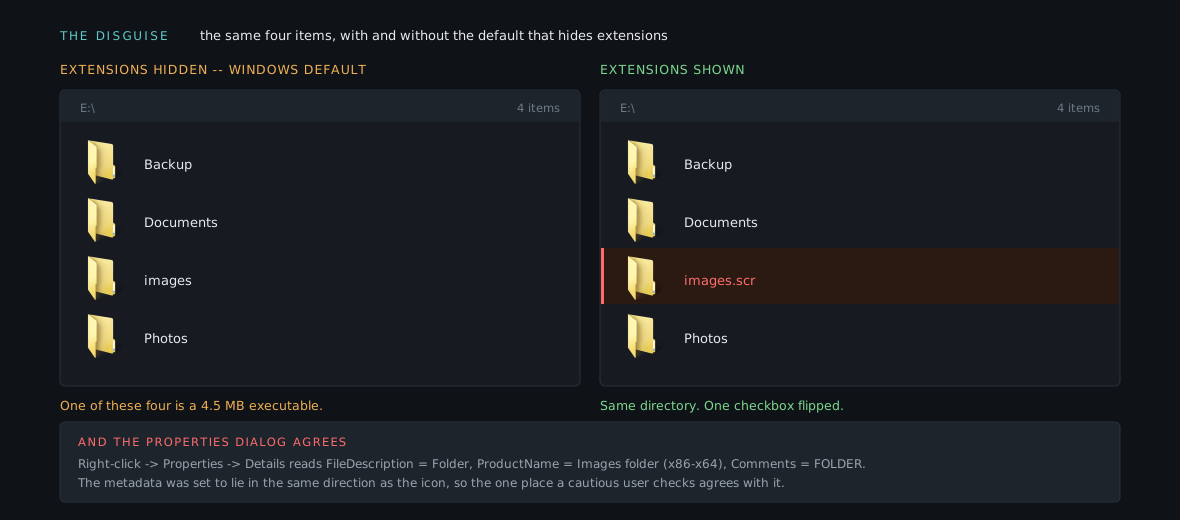
The primitive being abused is a default setting, which is why a decade of security improvements had nothing to say about it.
What it wants
Your electricity and your cycles, converted to Monero and deposited elsewhere. Not your files, not your credentials. A single host trickles, so the model only works at volume. The spreading therefore matters more to the operator than any individual infection, and it shapes the payout side:
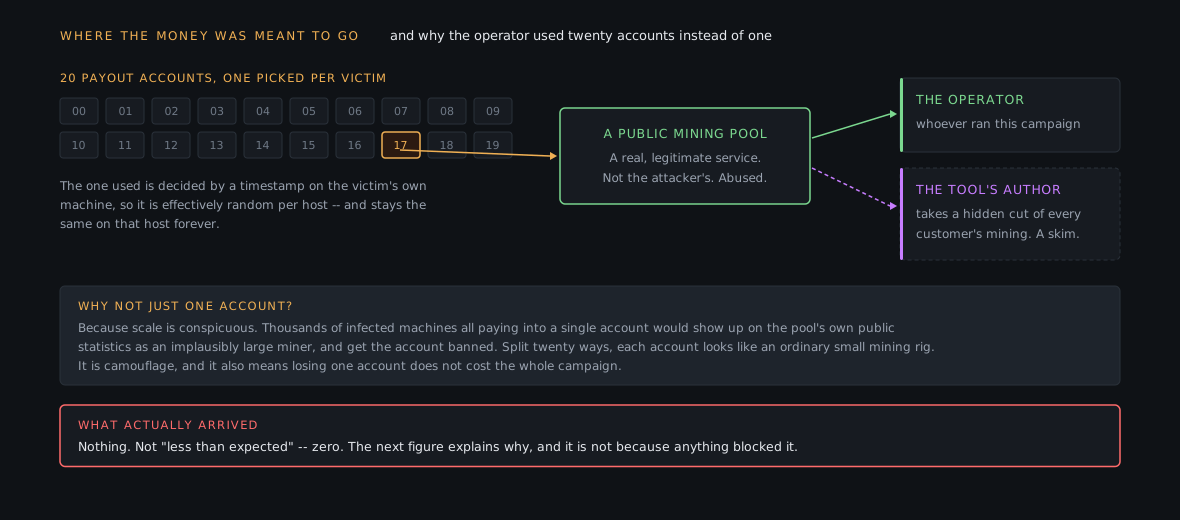
The dashed line is the detail worth keeping. The miner binary carries a second hardcoded payout address, a dev fee baked in by whoever wrote it. The operator was being skimmed by their own toolmaker.
That has an attribution consequence: artifacts inside a purchased tool belong to the vendor, not the deployer. An email address or build path recovered from the miner tells you about the toolmaker.
The chain, in order
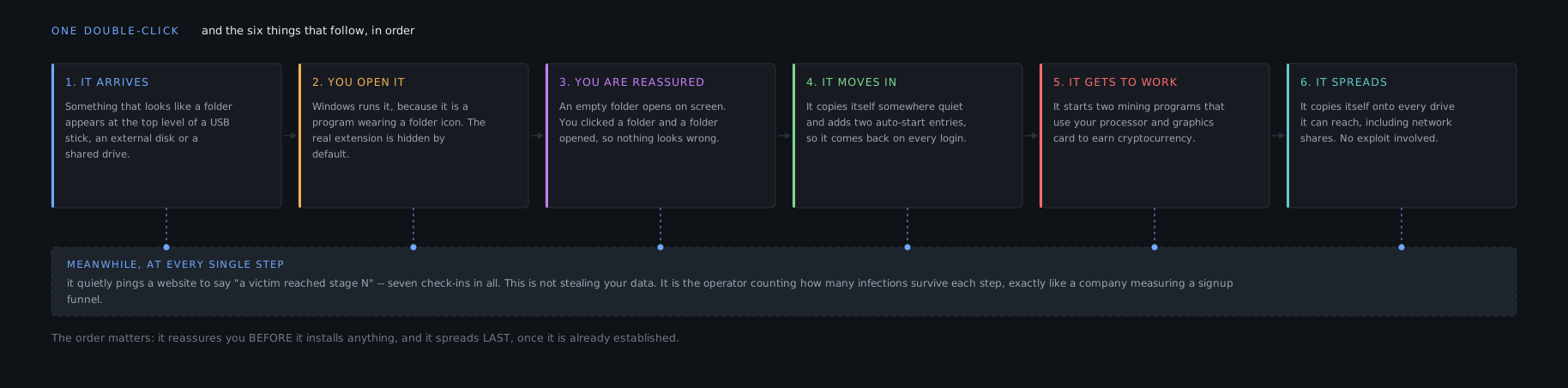
Why that order
Reassurance before installation. The empty folder opens almost immediately. Install first and you leave a window where the victim is staring at a screen that did nothing, which is when people go looking.
Copy before launch. It relocates first and runs the copy from there. Otherwise pulling the stick kills the infection.
Persistence before spreading. Auto-start is instant; walking every drive letter is slow and noisy. Securing the return path first means an interruption halfway through still leaves it installed.
Spreading last. Most likely to be noticed, least useful to this victim. It is an investment in the next one, so it goes where its failure costs least.
There is also a 30 second sleep between dropping the miners and running them, aimed at sandboxes with a fixed observation window. Half a minute of the attacker's time for a shot at being classified as boring.
The seven check-ins
Seven HTTP requests to a fixed address, one per stage reached. It downloads the response, deletes it unread, and moves on. No config, no exfiltration: the operator is measuring where infections drop out. How many saw the file, how many opened it, how many reached mining, how many spread it onward.
That is a conversion funnel. Someone is looking at those numbers and asking why stage four converts worse than stage three, which is a more useful model of their behaviour than any amount of detail about the binary.
How it travels
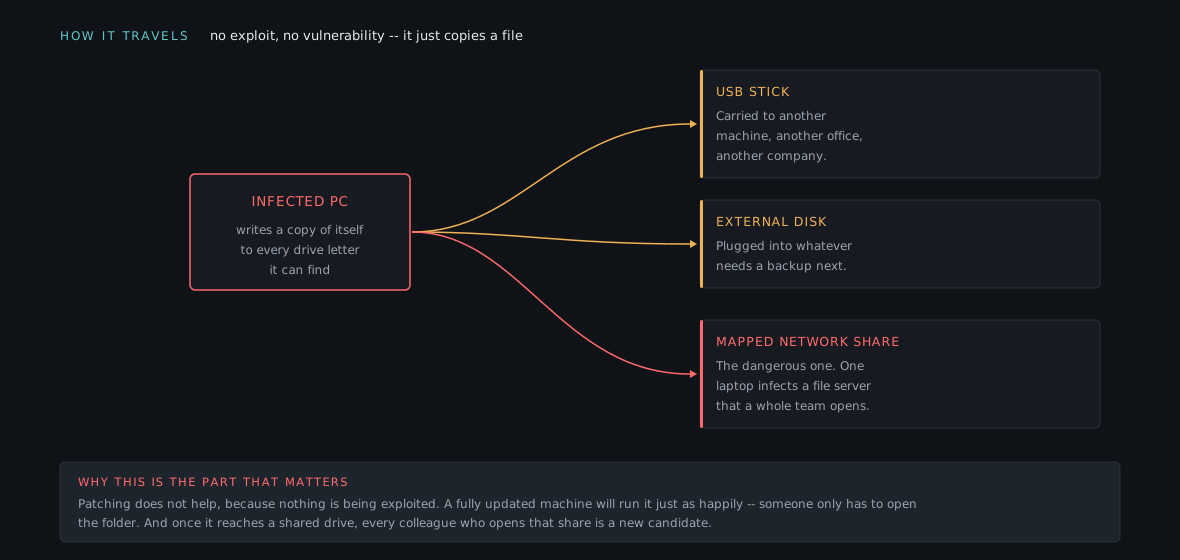
Patching is irrelevant. Nothing is being exploited, so the only gate is a double-click.
One laptop contaminates a department. Once it lands on a mapped share, it sits somewhere many people open in the normal course of work. So the cleanup instruction that matters is not "reimage the laptop", it is "enumerate the shares that laptop could write to". Skip that and you reinfect from your own file server.
And then it earned nothing
The chain above completed successfully. It also achieved none of its goal.
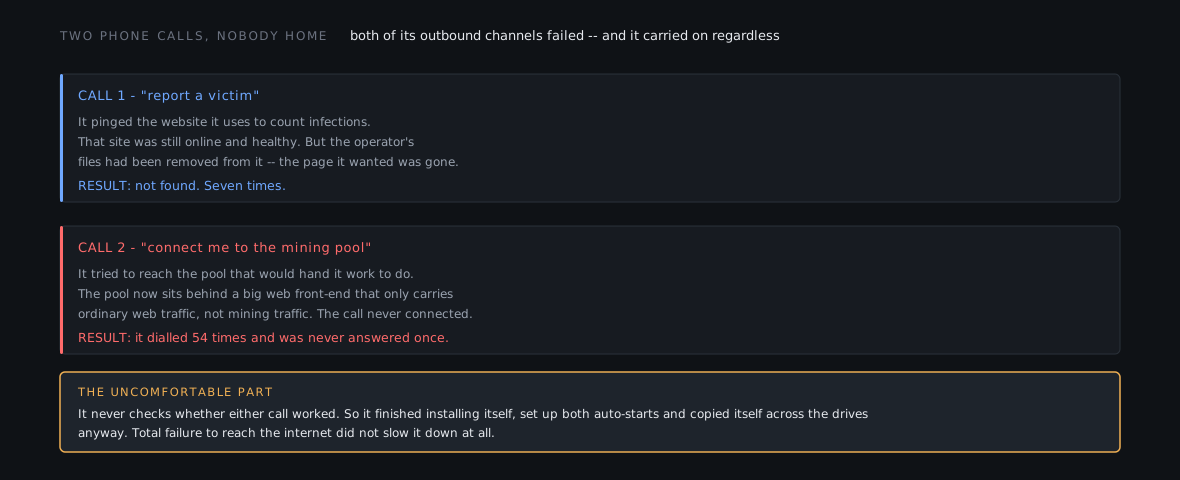
Neither failure is a defence working. The check-in host was up and healthy; only the operator's files were gone, which suggests a compromised legitimate site used as a drop point and since cleaned. The mining pool now sits behind a large web front-end that carries HTTP, not Stratum on a non-web port, so 54 connection attempts got nowhere.
And it never noticed. Not once does it check whether a network call succeeded, so the local half of the infection ran at full speed while completely cut off.
Which is the finding worth carrying: "the network side failed" and "we're fine" are different statements. A report saying "no successful connections observed" describes the attacker's luck, not your controls. The host was still compromised and still spreading.
The file is eleven years old
The miners were compiled in 2014 and early 2015. Monero changed its PoW several times, ending with a wholesale switch in late 2019, so a miner built for the old algorithm produces nothing the network accepts. This one was found in quarantine in January 2026. Fossil and harmless are different claims:
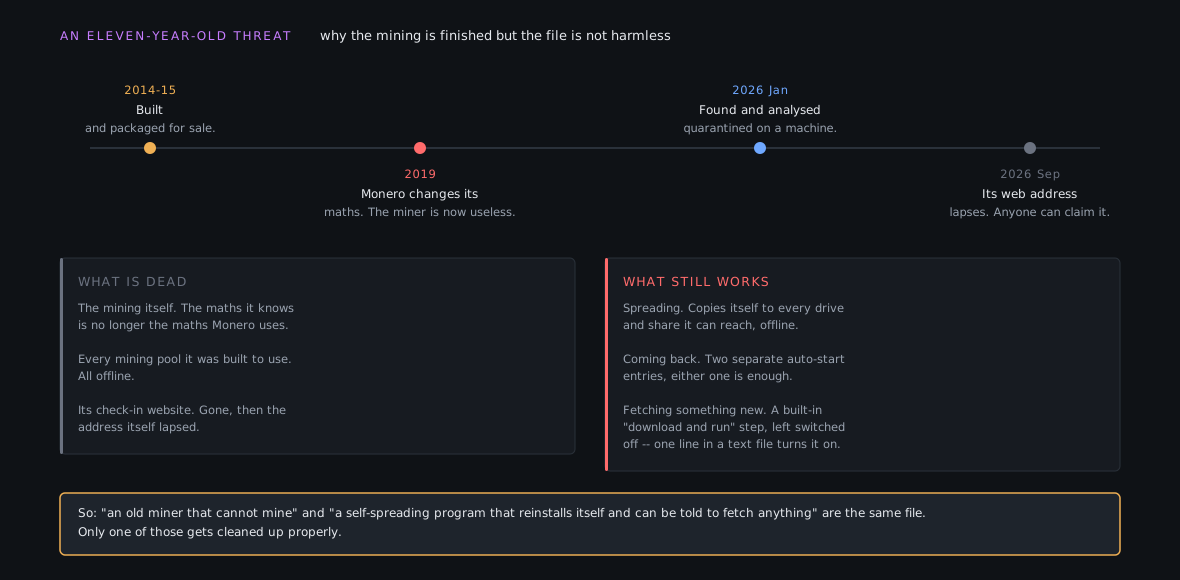
The right column is the argument of this post, and the third item is the one that matters. The installer reads a URL from a config entry, downloads whatever is there, and runs it hidden. In this build the entry is empty, so the step is skipped.
The machinery is intact. One line in a text file turns a dead cryptominer into a live loader for anything. That path never executed, so no dynamic analysis reports it. It only shows up if you read what the installer can do rather than what it did.
Generalised: a detonation report tells you one path through the program, not its capability set. Six capabilities in this sample never executed, and the most serious one is among them.
What to do about it
- Turn file extensions back on. Explorer, View, File name extensions.
Deployable by policy, and the disguise collapses the moment
images.scrstops rendering as images. - Treat an executable at a drive root as an anomaly. Nothing legitimate
installs itself to
D:\. Worth an alert on its own. - Alert on mining command lines, not mining binaries. Miners are commodity and repacked constantly, so hashes rot in days. A process launched with a pool address on its command line has to say so. That signal caught an eleven-year-old sample and will catch next year's.
- When you find one, enumerate the shares. The endpoint is the least interesting artifact. The file server it could write to is what reinfects everyone.
- Read the installer. If the sample is a dropper script, the script is the capability list.
One thing not to do: do not block the front-end provider's IP because it showed up in a report. It is shared with a large slice of the legitimate internet, the real server is behind it anyway, and a fleet-wide block will hurt more than the malware did.
Takeaways
- The exploit was a default setting. Hidden extensions plus a custom icon. No vulnerability, so no patch helps.
- Every step buys the next one. Reassure before installing, copy before launching, persist before spreading. The order tells you what the author was worried about.
- It measures itself. Someone is reading a conversion funnel and tuning the lure against it. Model the operator as a product team.
- Failed network activity is not protection. Both channels were dead and the infection still completed, persisted and spread.
- Obsolete payload, current risk. Triage each capability on its own.
The deep version, including how the installer was pulled apart, how the payload's identity and a hidden wallet were recovered from memory, and the detection rules that came out of it, is in the full teardown.