The tool that did nothing: how mimikatz turns one local admin into an entire domain
A file arrived flagged malicious, scored 100 out of 100, tagged with nine threat-actor names. It is mimikatz, and not a modified copy: I pulled the official release from the author's GitHub and diffed the two. Byte identical.
Then I looked at what it did while the sandbox was watching. It printed its banner, printed its prompt, and waited for someone to type. Nobody did.
A genuinely dangerous tool, sitting there completely inert. The danger is real, it is just not in the file: it is in the sequence a person drives it through. That sequence is what this post is about.
TL;DR
- Not malware in the usual sense. A credential-theft toolkit: 25 modules, 210 commands, published openly, running nothing until someone types.
- It is not after files. It is after the secrets LSASS holds so that single sign-on works: NTLM hashes, Kerberos keys, occasionally cleartext.
- None of that is a vulnerability. Windows keeps those secrets because single sign-on requires them. mimikatz is a well-informed reader.
- The attack is a five-step chain, and the order is forced: get the right to read memory → read the secrets → reuse one without cracking it → ask a domain controller for everyone else's → forge your own tickets from then on.
- Each step exists only because the previous one produced the key it needs. Cut any link and everything to its right is unreachable.
- The end goal is not passwords. It is the ability to issue identity, at which point a password reset evicts nobody and the cleanup most places run is incomplete.
- Our sample executed 0 of its 210 commands, provable from twelve characters left in a heap buffer.
- The tooling, meanwhile, asserted ten command-and-control techniques against a program with no network client, and detected its own monitoring library and filed it as the sample's behaviour.
One line to take away: the file is not the threat. The privileges of whoever ran it are, and the chain is how those privileges get converted into everything else.
It is not even pretending
The last sample I wrote up went to real trouble to look like a folder. The icon was the exploit, so the icon is now the first thing I look at. Here it is:

gentilkiwi and
this is the signature. No disguise: no misleading name, no fake publisher, no stolen
certificate on the executableThe version information agrees. The publisher field reads
gentilkiwi (Benjamin DELPY), the description reads
mimikatz for Windows, and there is a field left in the build that just says
Build with love for POC only.
Which matters practically: any deception is supplied by the operator, not by the artifact. Rename it, drop it somewhere plausible, or reflectively load it so it never touches disk. Detection built on the filename is worth very little.
What it wants, and why Windows gives it to them
This is the part that explains why it never gets patched.
Single sign-on means lsass.exe has to hold material it can present to
a server on your behalf, not a one-way scramble, and hold it for as long as the session
lives.
Separately, an administrator can read any process's memory, because debugging requires it.
Put those two together and you have the whole attack. Not a bug. Two features, both working exactly as designed.
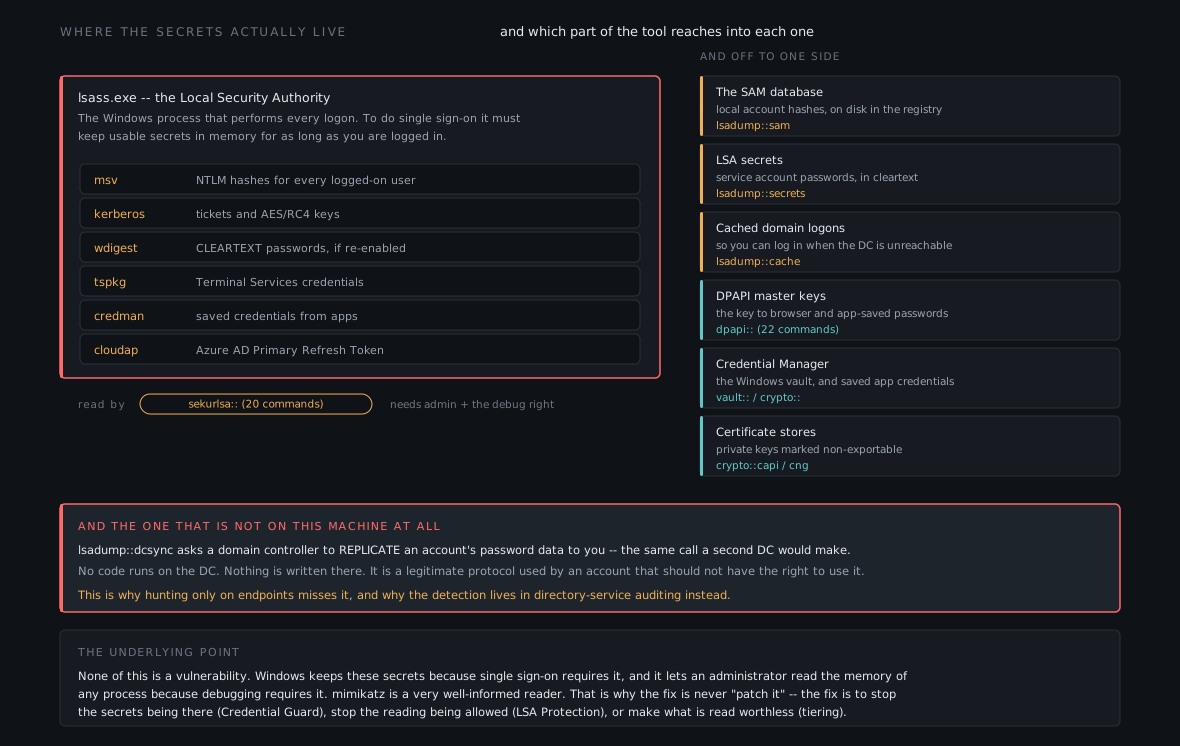
dcsync does not read this machine at all, which is why it gets
missedHow the program itself works
The mechanics first, because they explain why our copy sat there doing nothing.
mimikatz is a REPL. You type module::command; it splits on the double colon,
looks the module up in a table, the command up in that module's own table, and calls the
handler recorded there.
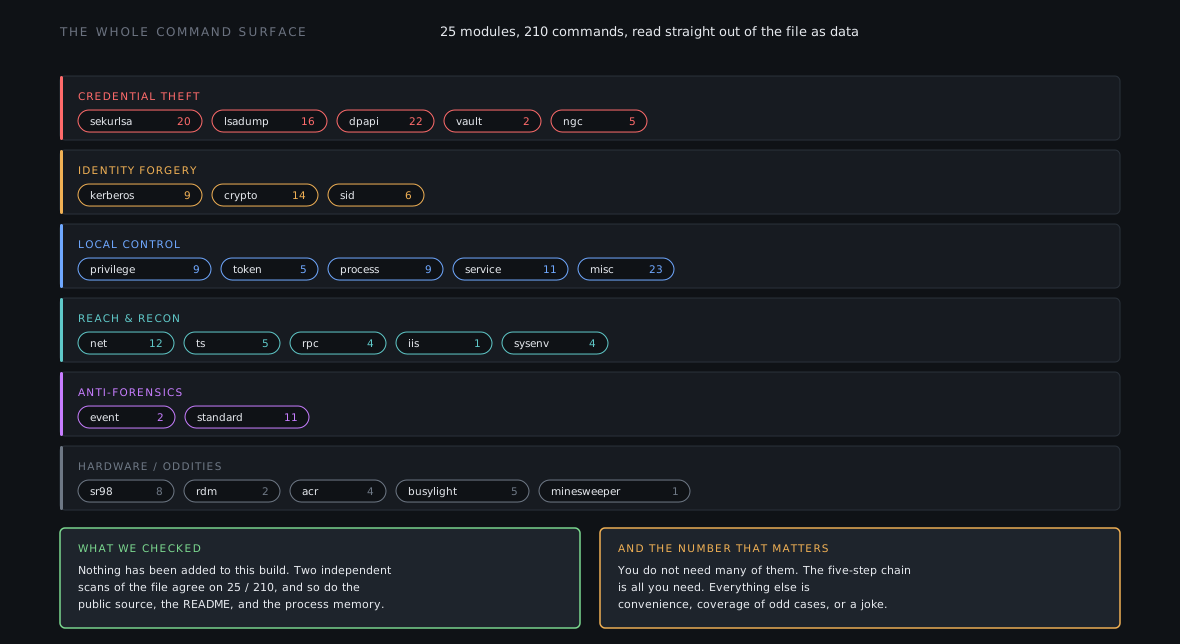
Because the dispatch is table-driven, the whole command surface sits in the file as data: handler addresses, names, help text. Read the table and you know everything the tool can be asked to do without executing an instruction. That is where the 25 modules and 210 commands come from, and how I confirmed nothing had been added to this build.
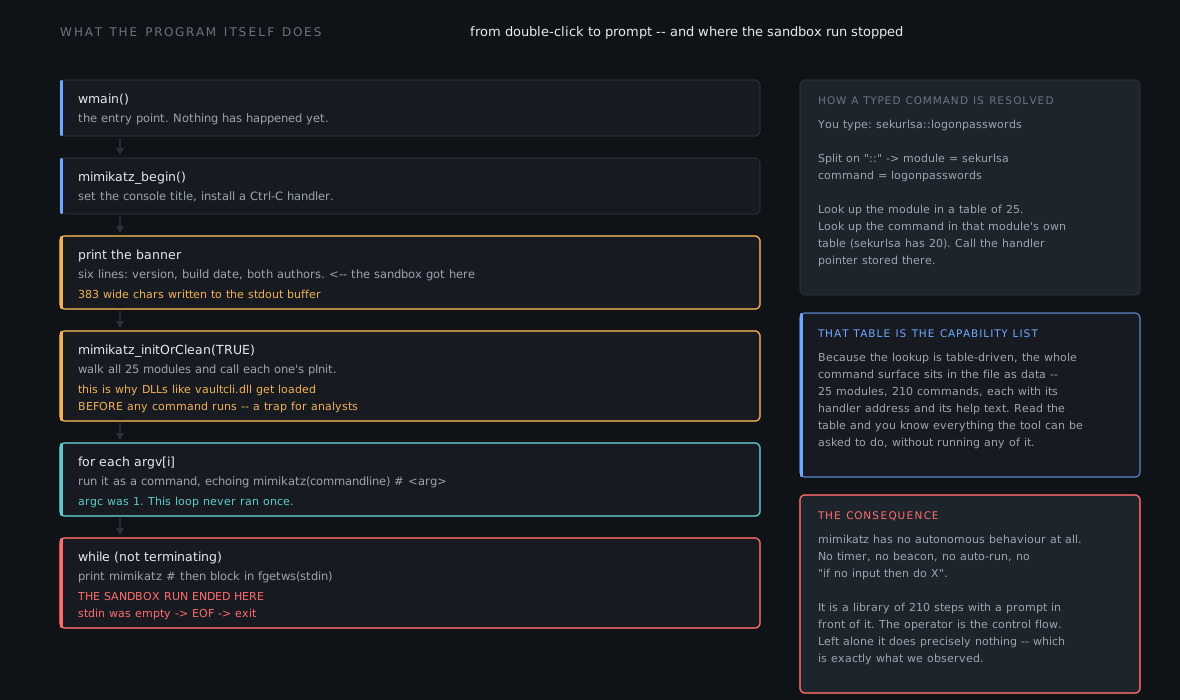
No timer, no beacon, no auto-run, no fallback if nobody types. It is a library of 210 steps with a prompt in front of it. The operator is the control flow.
The proof that ours ran nothing
An empty command line in a sandbox report proves nothing on its own: a blank field can just as easily mean the capture failed. So here is something better.
Console output lands in a CRT heap buffer, written from offset zero every time, with a live character count alongside it. That buffer survives into the memory dumps. Here is everything the process ever put in it:
stdout buffer, recovered from the dump.#####. mimikatz 2.2.0 (x64) #19041 Sep 19 2022 17:44:08 .## ^ ##. "A La Vie, A L'Amour" - (oe.eo) ## / \ ## /*** Benjamin DELPY `gentilkiwi` ( benjamin@gentilkiwi.com ) ## \ / ## > https://blog.gentilkiwi.com/mimikatz '## v ##' Vincent LE TOUX ( vincent.letoux@gmail.com ) '#####' > https://pingcastle.com / https://mimikatz.com ***/ mimikatz #
383 characters for the banner, then 12 for the prompt, written over the top of it from offset zero. Nothing after that.
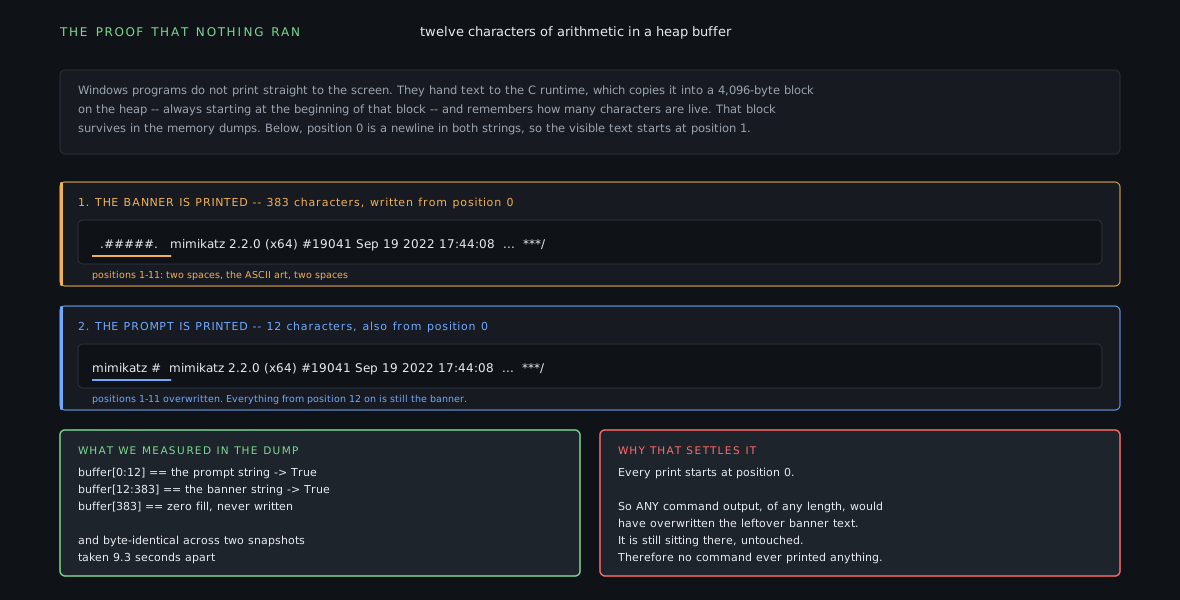
Two other things agree: the process's own recorded command line is a single item with no arguments, so the argument loop never had anything to iterate over; and the string the tool would have printed when running a command-line argument appears nowhere in any of the 146 memory dumps.
0 of 210 commands. Staged, not used, at least not in the window we were shown.
The chain, in order
Three rows per step: what it needs, the command, what it gives you. The third row of each step is the first row of the next. That is the whole structure.
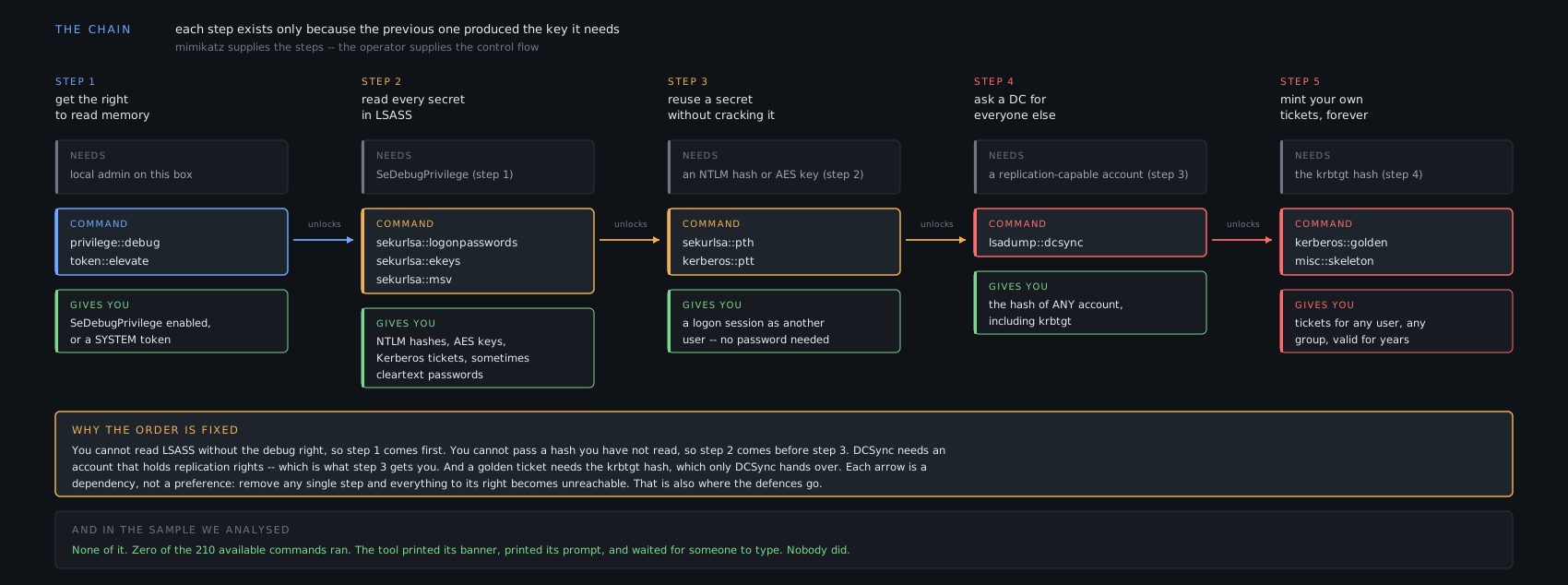
Why that order, and not some other order
It reads like a list of options. It is not. Each step is blocked until the previous one completes, and the reasons are mechanical:
- 1 before 2: reading another process's memory needs a privilege you
switch on first.
privilege::debugenables a right the token already carries; it grants nothing. Not an administrator, step fails, chain never starts. - 2 before 3: you cannot replay a secret you have not read. Note that nothing is cracked at step 3. The hash goes to the server as-is, because the hash is what the protocol accepts.
- 3 before 4:
dcsynchas to run as an account holding directory replication rights. Step 3 is how you become one without knowing its password. - 4 before 5: a forged ticket has to be signed with the domain signing
key, and
dcsyncis what hands it over.
A dependency graph, not a preference. Every link is somewhere to put a control, and early links are worth more than late ones.
The one step that breaks the pattern
One exception, and it is the detection gap people fall into. Step 2 has an offline
variant, sekurlsa::minidump, which parses a dump file of
lsass.exe instead of reading the live process.
That dump comes from a signed Microsoft binary. Task Manager will produce one from a right-click menu. Dump on the victim, copy the file off, parse it somewhere else entirely: mimikatz never touches the victim machine.
If your detection strategy is "find mimikatz", this costs you the whole case.
The surface it draws from
Five commands make the chain. The file contains 210. Here is the rest of it, grouped by what it is for:
minesweeper module,
a long-standing jokeTwo worth a second look. dpapi (22 commands) is the underrated one: the
route to everything the browser and the applications saved for you. misc (23)
is where the nasty one-liners live, including a skeleton key that makes one password work
for every account in the domain, an in-memory credential logger, and working
implementations of several named vulnerabilities.
The same file, four different outcomes
The tool escalates nothing by itself, so impact is set entirely by who ran it. This is the most useful frame for triage:
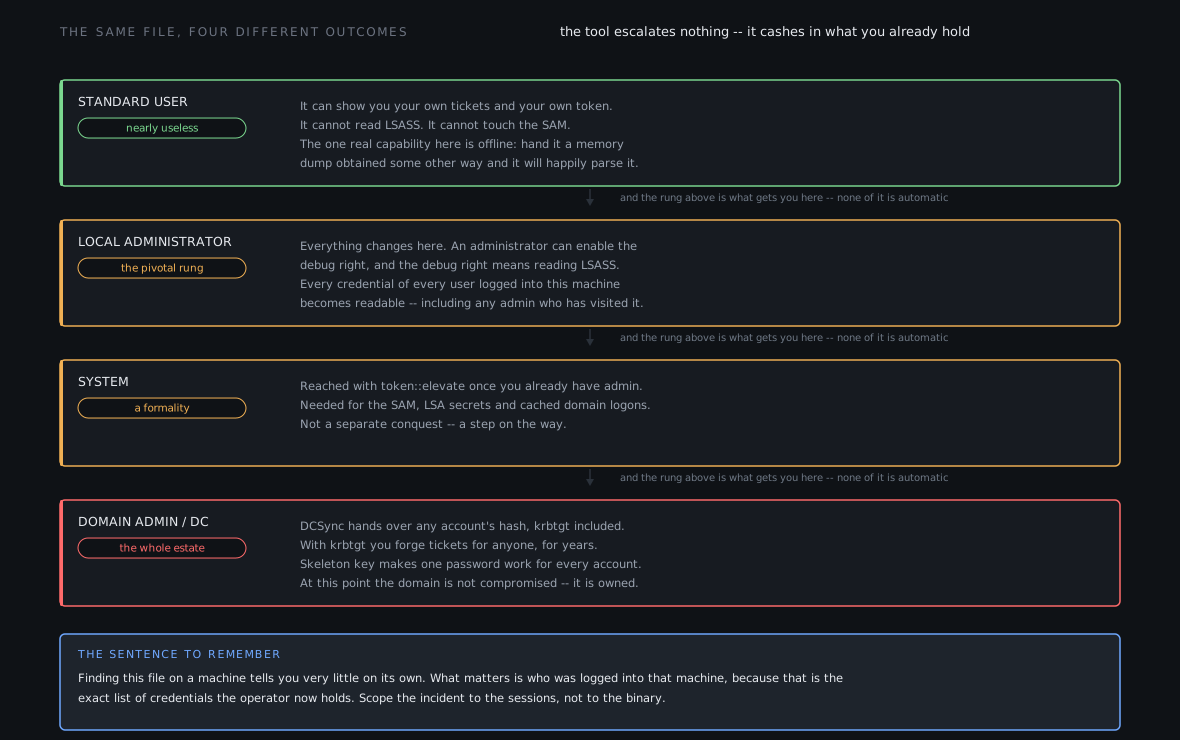
Finding this file tells you very little. Knowing who was logged into that machine tells you the blast radius, because that is exactly the set of credentials now in someone else's hands.
What it is all for
Step 5 answers "to what end", and it is where most remediation goes wrong.
Servers do not verify you. They verify a ticket signed with a key only domain controllers
hold, and that key belongs to krbtgt. One key, whole domain.
So the question is never "can they guess a password". It is "do they have the signing key".
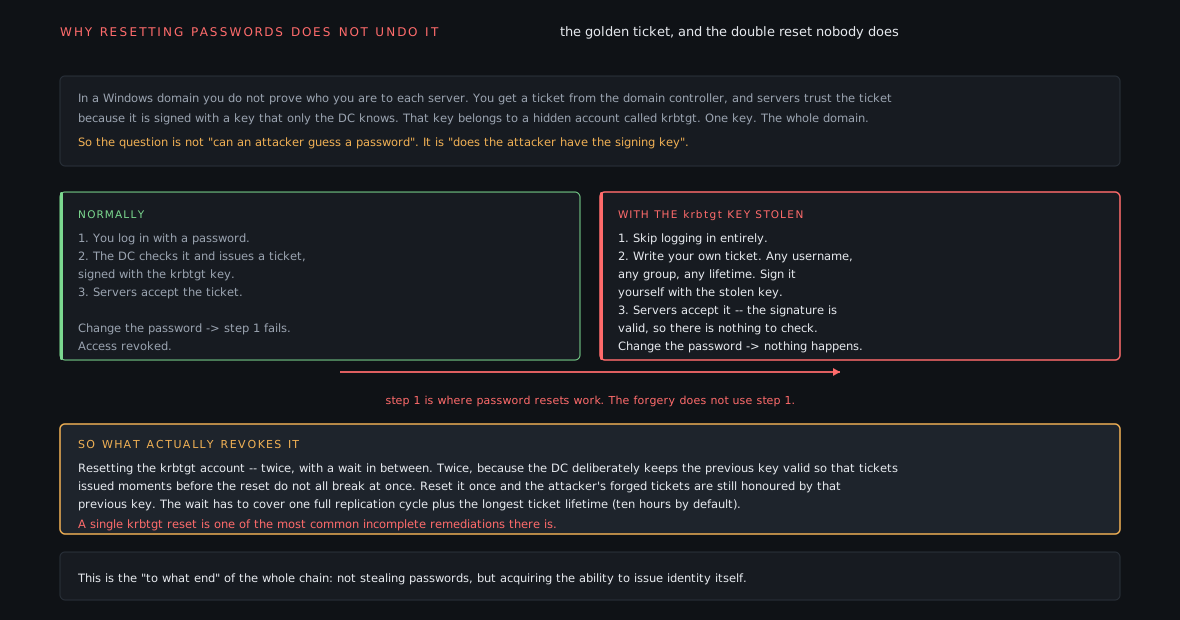
That is the destination of the whole chain. Not stealing passwords, acquiring the ability to issue identity. Once someone writes their own tickets they are not a user with stolen credentials any more, they are a second authority.
Where the defences actually cut
Because the chain is a dependency graph, the useful question is not "which products should I buy" but "which link am I cutting, and how early".
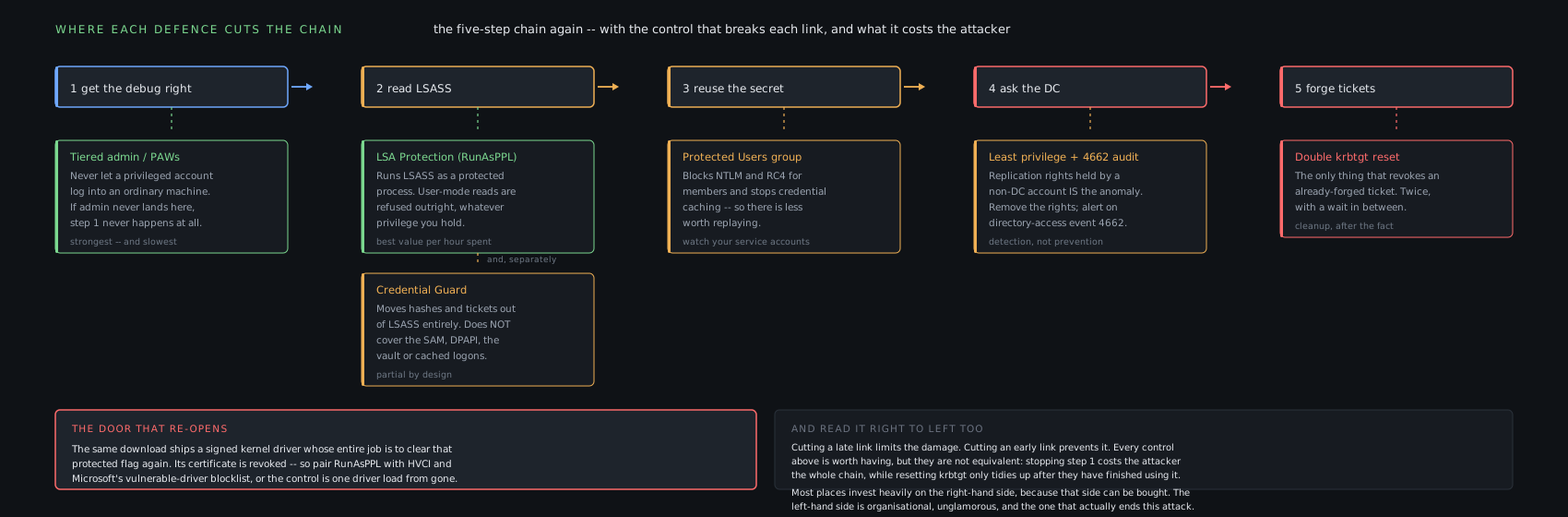
The one to single out is LSA Protection. lsass.exe runs as
a protected process and user-mode reads are refused regardless of privilege. It cuts step 2,
which everything downstream depends on, and it is one RunAsPPL value under
HKLM\SYSTEM\CurrentControlSet\Control\Lsa.
One caveat, and it is why the rest of the download matters. The same archive ships a kernel driver whose whole purpose is to switch that protection back off. It is signed by the author on a certificate the issuer revoked for "privilege withdrawn", expired, with no countersignature, so it should not validate anywhere. A revoked certificate only protects you as well as your revocation checking does. Pair LSA Protection with HVCI and Microsoft's vulnerable-driver blocklist, or the control is one driver load from gone.
What the automated tooling made of all this
A short detour, because the gap between the report and the artifact was wide.
The sandbox produced 324 signatures and mapped 127 ATT&CK techniques. That mapping contains none of the techniques this tool exists to perform. No LSASS credential dumping, no DCSync, no rogue domain controller, no golden ticket, no skeleton key.
It does assert data destruction, disk wiping, endpoint denial of service, email collection, screen capture, keylogging, process hollowing, and ten separate command-and-control techniques, one of them over mail protocols, against a program with no network client in its imports that produced, across the whole capture, zero packets that were not Windows talking to Microsoft.
Best of all, some of those signatures fire on strings that are not in the sample. They come
from a DLL loaded into the process from the Windows temp directory,
VxSSL64.dll. That is the sandbox's own monitoring library. It
detected itself and filed the result under the sample's behaviour. Two of the four bullets
under its "Evasive" heading are that.
The indicator export was worse. Thirteen of its twenty-two rows are typed as IP addresses
and are actually X.509 object identifiers, things like
2.5.29.15, the Key Usage extension, matched by a regex hunting four
dot-separated numbers. One row is 02d.cab, typed as a domain: it is the tail of
%s_%02d.cab, the format string used to name cabinet files, and .cab
is a real TLD. Five more rows are the authors' own websites, lifted straight out of the
banner above.
Feeding that list to a blocklist would break Microsoft sign-in, censor a security researcher's blog, and blackhole address space belonging to four national telecoms operators. It would catch nothing, because the tool has no infrastructure to catch.
So what do you actually do about it
In rough order of how much good it does:
- Stop privileged accounts logging into ordinary machines. Unglamorous, organisational, expensive, and the only one that ends the attack rather than inconveniencing it. If domain admin credentials never land on a helpdesk laptop, harvesting that laptop yields nothing.
- Turn on LSA Protection, paired with HVCI and the vulnerable-driver blocklist so the driver above does not undo it.
- Check your EDR is actually recording handle opens against
lsass.exe. Plenty of shipped configurations exclude it to cut volume, which quietly removes the best detection you have. Verify, do not assume. - Log command lines, and alert on the
::pattern. Renaming the executable is free; changing the command syntax breaks every cheat sheet and the operator's own habits. Alert on the syntax, not the filename. - Enable directory service auditing on your domain controllers and alert on replication rights being used by anything that is not a domain controller. Without that audit setting, the DCSync step is invisible.
- Also hunt for the LSASS dump, not just the tool. Task Manager and
comsvcs.dllcan produce it, and then the parsing happens on a machine you will never examine. - Write down now how you would do a double
krbtgtreset. Not during an incident. The procedure, the wait interval, and who authorises it.
And one thing not to do: do not treat the file hash as your control. This is the stock public release of an open-source tool. A recompile with the banner edited defeats every signature built on its strings, and an in-memory loader never writes a file at all.
Hard lessons
- I nearly shipped "no import" as proof of "no capability". The binary
imports no HTTP or socket library, and I wrote that it was therefore structurally
incapable of producing the encrypted connections in the capture. Then a review pass
pointed at
GetProcAddress, sitting right there in the same import table. The conclusion held. The reasoning did not.- Fix: an empty import table proves a capability is not statically linked, nothing more. The defensible wording is "has no such client in its imports and produced no such traffic here", which is what the evidence supports.
- What this argues for: having someone whose only job is to refute you. The same pass downgraded my network claim from verified to probable, on the grounds that a packet capture carries no process identity, so "no packets from the sample" is an inference however well supported.
- Every string the tool prints also exists in the file as a template.
Grep memory for
* Username :or* NTLM :and you get hits on a process that harvested nothing, because those are the format strings it would use if it ever did.- Fix: before reporting recovered credentials, check whether the
string still holds its format specifiers and whether it sits in the image mapping. A
hit with its
%sintact is the template, not the output. - What this argues for: for tools, "the binary contains X" and "the process did X" stay in separate columns all the way to the report. The technique mapping ended up labelled that way, 6 observed against 28 capability, because collapsing the two is exactly the error the sandbox made.
- Fix: before reporting recovered credentials, check whether the
string still holds its format specifiers and whether it sits in the image mapping. A
hit with its
- When a sample claims to be a known public tool, diff it against the real one
first. I burned the opening minutes on string dumps and section entropy before
noticing the decisive test was one
curland onecmp.- Worth noting: be precise about what that proves. Release archives on code-hosting sites are not signed, so I verified identity against the asset served today, not against what was published in 2022. Three pieces of server-side metadata agree it has not changed since, and all three come from the same source. A strong chain, not an independent one.
- A detection rule you have not false-positive tested is not a detection
rule. I wrote one matching the shape of the command table rather than any string
in it, on the theory it would survive a rename. Ran it against a corpus and hit a
Microsoft binary with 203 matches of the pattern against mimikatz's 50.
No count threshold separates those two, and the structures turn out to be scattered
rather than laid out in a row, so no spacing test does either. The shipped rule pins the
structure to the codebase's own internal function-name prefixes, which appear in hundreds
of places and are expensive to strip.
- What this argues for: publish the corpus size next to the result. "Zero false positives" means nothing without "across 14,550 binaries" after it.
- The most alarming parts of the report were the tooling, not the sample.
A 100-point threat score, nine actor names and 127 techniques, on a process that printed
six lines of text and exited.
- Fix: keep the sandbox's observations, discard its conclusions. The process list, the registry and file operations, the module list and the section hashes were accurate and did real work here. The signature names and the technique mapping were string-presence heuristics.
- What this argues for: tool tags are not attribution. Those nine actor names expand from two records associating mimikatz with two groups. So does every red team on earth. Writing "operator: unknown" is what stops a phantom actor being inherited as fact by whoever reads the ticket next.
What went well: diffing against upstream early turned an open-ended "is this backdoored" into a closed question and reframed everything after it. The stdout buffer gave a positive proof of inaction rather than an argument from absent evidence, which is the difference between "we saw no commands" and "no command ran". And the detection content was measured against a benign corpus before it shipped, which is the only reason I know the first version of it was useless.
Takeaways
- The file is not the threat; the sequence is. No beacon, no persistence, no propagation, no timer. 210 steps and a prompt. The danger is entirely in what a person chains together.
- The chain is a dependency graph, so it has weak links. Each step is unreachable until the previous one hands it a key. That is not just a description of an attack, it is a list of places to put a control.
- Impact is set by the operator's privilege, not by the binary. At standard user it is nearly inert. At local administrator every credential on the box is readable. Scope your incident to who was logged in, not to what was on disk.
- The goal is not passwords, it is the power to issue identity. Which is
why a password reset does not evict an attacker who reached step 5, and why the
krbtgtreset has to happen twice. - None of it is a vulnerability, so none of it gets patched. Windows keeps usable secrets in memory because single sign-on needs them, and lets administrators read process memory because debugging needs it. The defences remove the secrets, or remove the reading, or make what is read worthless.
- "It did nothing" is an observation about one detonation, not a verdict on a file. Ours ran zero of 210 commands, and all 210 were intact and ready. On a real host the safe assumption is the opposite: somebody was there, typing.
The full teardown is in the case report for 61c0810a: how the
command table was recovered from the file as data, the certificate work on the driver, the
clock reconciliation that fixed a seven-hour error in the timeline, and the detection
content with its corpus results.